
Spring Clean Your Joomla Site: How to Reclaim Disk Space and Remove the Clutter
Every Joomla site tells two stories. There's the one your visitors see — the polished pages, the carefully chosen images, the smooth navigation. Then there's the one lurking behind the scenes: a growing pile of orphaned images nobody uses, leftover database tables from extensions you uninstalled years ago, and broken file references quietly collecting dust.
If you've been running a Joomla site for any length of time, you'll know exactly what this looks like. Your /images/ directory has ballooned. Your extension manager lists plugins you don't recognise. Backups take longer than they should. And every time you think about upgrading to Joomla 6, a small voice in the back of your head says, "not until I've sorted all of that out."
Two extensions from SE24Media are designed to tackle precisely this problem — and they work remarkably well together.
The Hidden Cost of Unused Images
Articles get rewritten. Page builder layouts evolve. Old banners are swapped out for new ones. But the images tied to all that previous content? They stay exactly where they are, sitting in your /images/ folder, consuming disk space and cluttering your media manager.
On a small site this is a mild annoyance. On a site that's been active for several years — particularly one using image-heavy extensions like SP Page Builder, K2, or VirtueMart — the volume of orphaned images can be staggering.
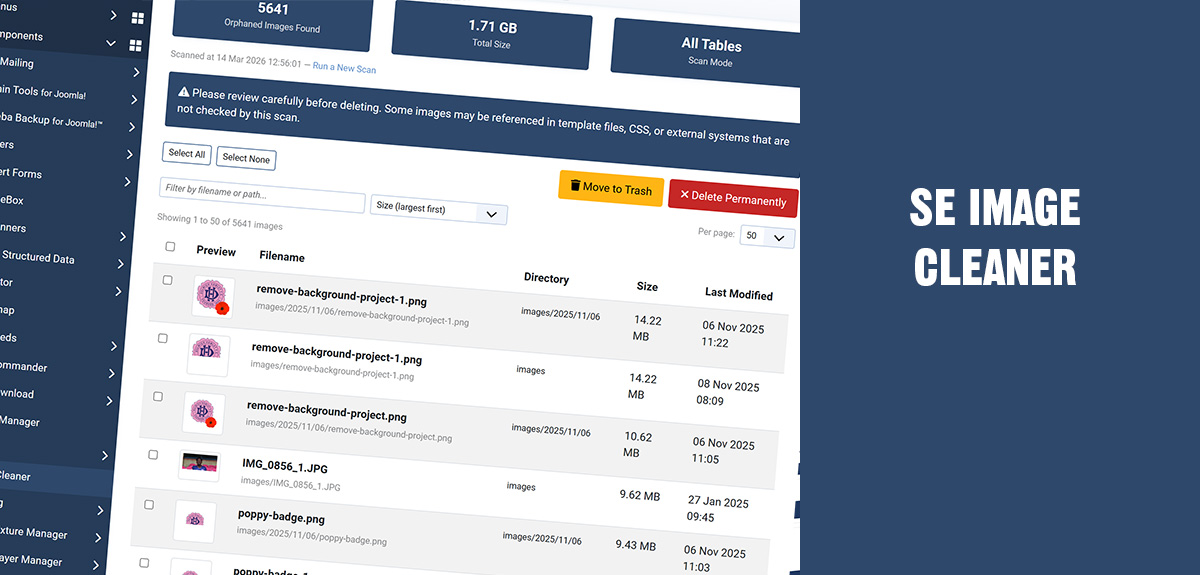
SE Image Cleaner addresses this head on. It scans every file in your /images/ directory and cross-references it against your entire Joomla database. Any image that isn't referenced anywhere is flagged as an orphan.
What makes it practical rather than just clever is the way scanning is handled. The entire process runs via AJAX, working through one database table at a time with a live progress bar. There are no PHP timeouts to worry about, no white screens, and no memory errors — even on large sites with tens of thousands of images.
It isn't limited to Joomla core content either. SE Image Cleaner recognises references from popular extensions including SP Page Builder, EasyBlog, VirtueMart, Kunena, JCE, and Akeeba Engage, among others. A deeper "Scan All Tables" mode goes further still, checking every text column in every database table, catching references you might not even know existed.
Once orphans are identified, you have full control. Preview thumbnails before taking action. Filter and sort by filename, size, or date. Move items to a built-in trash folder as a safety net — where they can be restored to their original location at any time — or delete them permanently when you're confident. A safe list feature lets you protect images that are referenced in template files, CSS, or hardcoded paths, so they're automatically skipped in future scans.
The extension installs cleanly and removes just as cleanly. It creates no database tables of its own, needs no cron jobs, and has no external dependencies.
Pricing: £39 — compatible with Joomla 5.0 and 6.0.
What About Everything Else?
Orphaned images are only part of the picture. Joomla sites also accumulate ghost extensions — components, plugins, and modules that were partially removed or had their files deleted manually but still linger in the database. Joomla's built-in uninstaller often can't handle these because it tries to remove files that no longer exist on disk, resulting in the familiar "Path is not a folder" error.
Then there are the orphaned database tables. Uninstall an extension through Joomla and there's no guarantee its tables are removed. Over time, these pile up — dozens of unused tables sitting in your database, adding weight to backups and creating confusion during upgrades.
SE Extension Cleaner is built to audit and resolve all of this. It runs a five-point scan across your entire site — components, modules, plugins, database tables, and extension files — and produces a scored breakdown classifying each item as In Use, Review, Likely Unused, or Unused.
The orphaned table detection is particularly thorough. It can identify the original owner for over 120 known extensions, so instead of staring at a table name like #__jcomments and wondering where it came from, you get a clear answer.
A broken file scanner separates genuinely missing files from harmless manifest mismatches, helping you focus on what actually matters. And the Force Uninstall feature handles those stubborn ghost extensions cleanly, removing extension records, admin menu items, module instances, update sites, and schema versions in a single click. If the extension was part of a package, orphaned package records are automatically tidied up too.
Safety is built into every step. Every destructive action is protected by an automatic SQL backup. A full action log tracks every change with timestamps and user details. And when you need to share findings with a client or document the state of a site, downloadable PDF audit reports and per-category CSV exports are available directly from the results screen.
Pricing: £39 with 12 months of support — compatible with Joomla 5.0 and 6.0.
Better Together
While each extension stands on its own, using them together gives you a comprehensive site cleanup workflow:
-
Start with SE Extension Cleaner to audit your installed extensions, remove what you don't need, and drop orphaned database tables. This ensures you're not keeping extensions around that are generating unused media in the first place.
-
Follow up with SE Image Cleaner to sweep through your
/images/directory and clear out everything those removed extensions — and years of content editing — left behind.
The result is a leaner, faster Joomla installation with a smaller backup footprint, a tidier database, and a media library that only contains what you're actually using. If you're preparing for a Joomla upgrade, handing a project to a new developer, or simply committed to keeping your site in good shape, this is time well spent.
Where to Get Them
Both extensions are available from SE24Media:
- SE Image Cleaner — Product Page | Documentation
- SE Extension Cleaner — Product Page | Documentation
Both are fully compatible with Joomla 5.0 and 6.0, and come with dedicated support.