

Today we're excited to announce the launch of SE Real Estate — a full-featured, AI-powered real estate component built from the ground up for Joomla 5 and Joomla 6.
Whether you're running a small local agency or a large property portal, SE Real Estate gives you everything you need to showcase listings, generate leads, and deliver a modern property search experience your visitors will actually enjoy using.
Built for Joomla 5 and 6
SE Real Estate is written entirely to the Joomla 5 and 6 MVC architecture. No legacy code, no compatibility hacks — just a clean, modern extension that takes full advantage of everything the latest versions of Joomla have to offer. That means faster performance, better security, and a codebase that will stay maintainable for years to come.
AI-Powered Property Search
This is where SE Real Estate sets itself apart. We've integrated AI directly into the property search experience, so your visitors don't have to fill in endless filter forms to find what they're looking for.
Instead, they can describe what they want in plain language — "a three-bedroom house near good schools with a garden under £400,000" — and the AI interprets that query, maps it to your listings, and returns the most relevant results instantly. It understands context, synonyms, and intent in a way that traditional keyword or filter-based search simply can't match.
The result is a search experience that feels intelligent and effortless, reducing friction and keeping potential buyers and renters engaged with your site longer.
Interactive Map Search
The map search page is one of SE Real Estate's standout features. Listings are plotted in real time on an interactive map powered by Google Maps and Google Places, giving visitors a genuine sense of location context that static listings simply can't provide.
Users can pan and zoom freely, with results updating dynamically as they explore the map. Filter by price, property type, number of bedrooms, or any custom field — the map responds instantly. Click any pin to get a quick summary, then dive into the full listing detail. It's the kind of property search experience visitors expect from the biggest portals, now available on your Joomla site.
A Component That Grows With You
SE Real Estate is designed to be flexible. Out of the box you get everything you need to go live quickly, and our optional additional services mean you're never on your own:
- Professional Installation & Configuration — we'll install SE Real Estate on your Joomla site and configure it to match your setup, including Google Maps and Google Places integration.
- Property Import Service — already have listings elsewhere? We'll import your existing properties directly into SE Real Estate so you can hit the ground running.
- Google Maps & Places Setup — we handle the API configuration so your map search works perfectly from day one.
All of these services are available directly at checkout when you purchase SE Real Estate, so you can pick exactly the level of help you need.
Why Now?
The real estate market online is more competitive than ever. Buyers and renters have high expectations — they want fast, intuitive search, accurate location data, and rich listing detail. Until now, delivering that on Joomla meant stitching together multiple extensions, compromising on features, or settling for components built on ageing codebases.
SE Real Estate changes that. It's the component we wished existed, and we think the Joomla community has been waiting for something like it.
Get Started
SE Real Estate is available now. Head to our product page to explore the full feature list, view the demo, and choose the plan that suits you. And if you need a hand getting set up, our installation and import services are there to make your launch as smooth as possible.
We can't wait to see what you build with it.
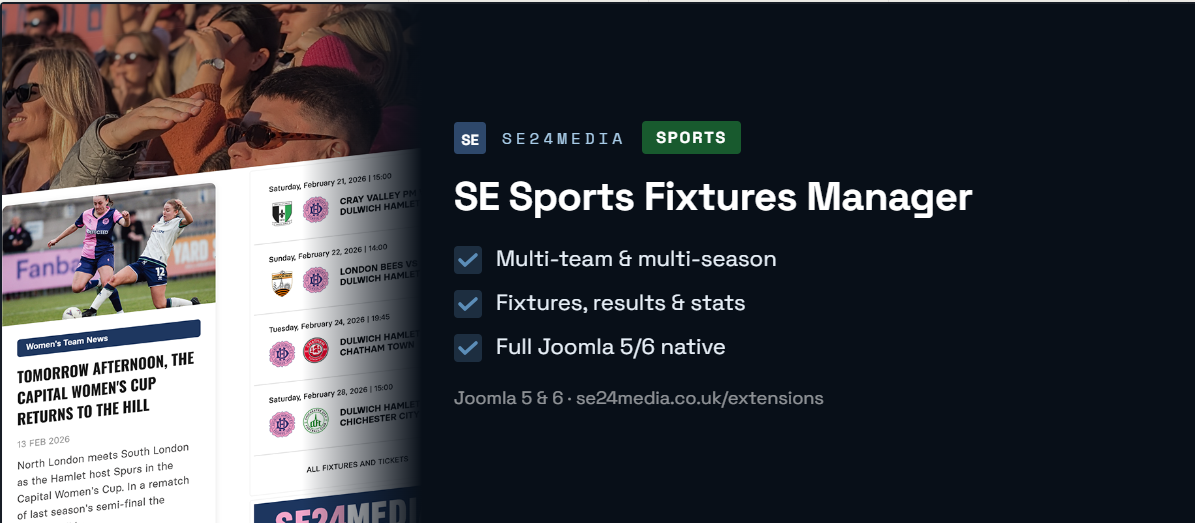
Our Sports Components Are Now Free to Download
Product Update · May 2026
We're thrilled to announce that both SE Sports Fixtures Manager and SE Sports Player Manager are now available as free downloads — with a Pro tier unlocking everything you need to run a professional sports club online.
Since launching our sports extensions for Joomla, we've heard the same thing from clubs time and again: they want to try before they commit. Small clubs and volunteer-run organisations in particular need to know a tool works for them before spending anything. We listened, and today we're making that possible.
Both components now ship with a fully functional free tier. No trial period, no expiry — just download, install, and get started. When your club is ready to scale up, the Pro upgrade is there waiting.
SE Sports Fixtures Manager
A complete Joomla solution for managing and displaying sports fixtures, results, and statistics — built natively for Joomla 5 and 6. Whether you run football, hockey, rugby, or any other sport, this component gives you a structured, intuitive way to manage seasons, competitions, teams, and match data from a single dashboard.
Admins can create fixtures with detailed information including opponent, venue, kick-off time, match status, scores, attendance, ticket links, and match programmes. On the front end, fixtures are grouped by month in a clean responsive layout, complete with competition logos, score display, and sponsor slots.
Free vs Pro
| Feature | Free | Pro (£39/year) |
|---|---|---|
| Teams | 1 | Unlimited |
| Seasons | 1 | Unlimited |
| Competitions | 1 | Unlimited |
| Fixtures | Up to 20 | Unlimited |
| Frontend display | Basic | Full |
| Statistics & reports | ✗ | ✓ |
| Sponsor advertisements | ✗ | ✓ |
| CSV import & export | ✗ | ✓ |
| 12 months support | ✗ | ✓ |
| All future features | ✗ | ✓ |
Download Free · Buy Pro · View Product Page
SE Sports Player Manager
A fully customisable Joomla squad management component — built for clubs that want a professional way to showcase their players and staff online. Add player profiles with photos, squad numbers, positions, biographies, and up to two sponsor logos per player. Drag-and-drop ordering in the admin lets you arrange your squad exactly how you want it displayed.
The responsive card grid looks sharp on every device, with automatic separation of players and management staff into tabbed views. Every colour, font, badge, and card style can be configured to match your club's branding — no code required. Multi-team clubs can manage men's, women's, and youth squads all from one interface.
Built from the ground up for Joomla 4, 5, and 6 — native MVC architecture, clean SEF URLs, and zero external dependencies. Just clean, maintainable Joomla code.
Free vs Pro
| Feature | Free | Pro (£19/year) |
|---|---|---|
| Teams | 1 | Unlimited |
| Players | 12 | Unlimited |
| Positions | 6 | Unlimited |
| Frontend display | Basic | Full |
| Polls & fan voting | ✗ | ✓ |
| 12 months support | ✗ | ✓ |
| All future features | ✗ | ✓ |
SE Sports Player Manager is available at £19/year including 12 months of support.
Pro Version Bundle & Save
Need both components? The Sports Package bundles SE Sports Fixtures Manager Pro and SE Sports Player Manager together for £69 — saving you £14 compared to buying separately.
Why Free?
We build these extensions because we genuinely love the Joomla community, and we know many of the clubs using Joomla are run by volunteers on tight budgets. Making the Fixtures Manager free to get started means a Sunday league side has the same tools available to them as a professional club — and that feels right to us.
The Pro tier exists to sustain ongoing development, keep the documentation up to date, and provide real human support when you need it. If your club grows, or you need the advanced features, upgrading is straightforward and affordable.
What's Next
Both components are actively maintained and updated. The Fixtures Manager is already on v3.0.5 with Joomla 6 support confirmed, and all future features ship to Pro users automatically. We have a roadmap of enhancements in the works — and now that more clubs are using the free tier, your feedback will shape what we build next.
Head over to the product pages to download, read the documentation, or take a look at the live demo on Dulwich Hamlet FC's website to see both components in action.
Useful Links

The final whistle has blown, the last league table has been frozen in time, and the boots are going into storage for the summer. But while your players are putting their feet up, the end of the football season is actually the perfect moment for club administrators and webmasters to take stock — and upgrade the tools that keep your club's online presence running.
If your club website runs on Joomla, we've got something worth knowing about.
Introducing the SE Sports Package
We've bundled our two most popular sports extensions into one great-value package, and you can grab both for just £50 — saving you £13 on buying them separately.
The SE Sports Package includes:
- SE Sports Fixtures Manager (normally £39)
- SE Sports Player Manager (normally £24 — wait until you read more below)
That's a complete club website management toolkit in one go, with 12 months of support included on each extension.
SE Sports Fixtures Manager — Every Result, Every Competition, All in One Place
If you've been manually updating fixtures and results on your website all season — copy-pasting scores, fiddling with tables, trying to keep everything in order across multiple teams — this extension will feel like a revelation.
SE Sports Fixtures Manager is a comprehensive fixture and results management system built specifically for Joomla 5 and Joomla 6. From a single admin dashboard, you can manage seasons, competitions, teams, and all your match data without breaking a sweat.
Each fixture can carry a full set of details: opponent, venue, date, kick-off time, match status, scores, attendance figures, ticket links, and even downloadable match programmes. It's everything your supporters want to see, presented cleanly and professionally.
What makes it stand out:
- Multi-team support — perfect if you run men's, women's, youth, or veterans squads
- CSV import and export — upload an entire season's worth of fixtures in one go, or export results for your records
- Rich statistics — win/draw/loss records, goal stats, attendance figures, competition breakdowns and opponent history, all filterable by season, team, or date range
- Sponsor advertisements — display sponsor banners above or within your fixture lists
- Fully customisable styling — adjust colours, fonts, and button styles independently for desktop, tablet, and mobile to match your club's branding
- Upcoming fixtures module — drop a widget anywhere on your site showing your next few matches
The front end displays fixtures grouped by month, with competition logos, scores, ticket buttons, and match programme downloads. It's the kind of professional presentation that used to require a developer every time you wanted a change.
Works with football, rugby, hockey, and plenty of other sports too.
SE Sports Player Manager — Your Squad, Showcased Properly
Got a squad page that's a static list of names, or worse, hasn't been updated since last January? SE Sports Player Manager gives your supporters the professional squad showcase they deserve — and gives your admin team a genuinely easy way to keep it current.
This component lets you build detailed player profiles with photos, position, squad number, biography, date joined, age, and even sponsor details. Everything is managed from a clean Joomla admin interface, with drag-and-drop ordering so you can arrange players exactly how you want them displayed.
On the front end, players are shown in a responsive card grid that looks sharp on any device. Clicking a card takes visitors through to a full profile page. Players and management staff are automatically separated into tabbed views, keeping things organised without any extra effort on your part.
Key features:
- Multi-team support — manage multiple squads (men's, women's, under-18s, etc.) from one interface, each with their own automatically filtered page
- Voting system — let supporters vote for their player of the season
- Full branding control — every colour, font, card style, and badge can be configured to match your club colours, no coding required
- SEF-friendly URLs — clean, readable links like
/squad/jane-smithrather than ugly query strings - Sponsor management — add up to two sponsors per player profile
- Native Joomla — built from the ground up for Joomla 4, 5, and 6 with no external dependencies
Why Now Is the Right Time
The close season is short, and pre-season comes around faster than you'd think. Here's why right now — after the last ball has been kicked — is the ideal window to get this sorted:
You have time to set things up properly. Installing and configuring during a busy matchday period is stressful. Do it now and you can take your time, import your data, and get everything looking exactly right before pre-season fixtures start landing.
Your squad is changing. Summer always brings transfers, new signings, leavers, and squad reshuffles. Getting the Player Manager in place now means you're ready to update your squad pages professionally the moment those moves are confirmed, rather than scrambling to edit a static page.
Next season's fixtures will arrive soon. Leagues typically release schedules over the summer. With the Fixtures Manager ready to go, you can import your entire upcoming season in minutes rather than manually entering every match.
Your supporters are still engaged. Just because the season's over doesn't mean people stop visiting your website. End-of-season stats, player profiles, and looking ahead to next season all drive traffic — and now's the time to make sure your site is ready to serve them well.
Get the Bundle
Grab both extensions together for £50 — a saving of £14 — with 12 months of support included on each.
Want to try before you buy? Both extensions have live demo sites you can explore:
Full documentation is available for both extensions, and if you have any questions before purchasing, get in touch — we're happy to help.
Both extensions require Joomla 5 or Joomla 6. The Sports Package includes 12 months of support for each component from the date of purchase.
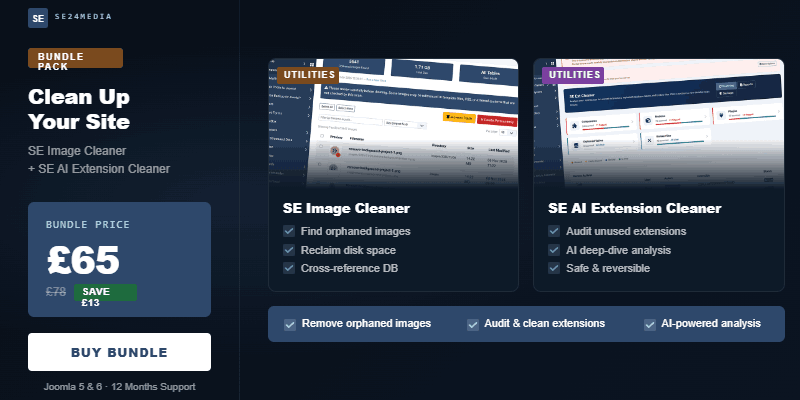
Your Joomla Site Needs a Spring Clean Before Summer
Published by SE24Media · May 2026 · 6 min read
Summer is a good time time for Joomla upgrades. Whether you're pushing from Joomla 4 to 5, or finally making the leap to Joomla 6, the single biggest risk isn't the upgrade itself — it's the years of clutter lurking underneath. Here's how to fix that before you touch a version number.
Every Joomla site tells a story of its past. Extensions installed and forgotten. Articles rewritten with their images still sat in /images/. Migration attempts that left database tables orphaned. Theme switches that stranded entire plugin sets. Over months and years, this sediment builds up — and when upgrade time arrives, it's this clutter that causes the headaches.
The good news? With the right tools, a pre-upgrade audit takes hours, not days. And a leaner, cleaner site is faster, safer, and dramatically easier to migrate.
Start with your extensions: the hidden risk in every upgrade
When Joomla releases a new major version, extensions that worked fine on the old version can silently break on the new one. Missing file paths, deprecated hooks, changed APIs — any of these can take down a component you didn't even know was still active. The safest approach is always to go into an upgrade with only the extensions you actually need.
The problem is knowing which ones those are.
A typical Joomla site that's been running for 4+ years has, on average, 20–30% more extensions installed than are actually in active use. Each one is a compatibility risk on upgrade day.
SE AI Extension Cleaner
£39 · Joomla 4, 5 & 6 · PHP 8.1+ · v2.1.0
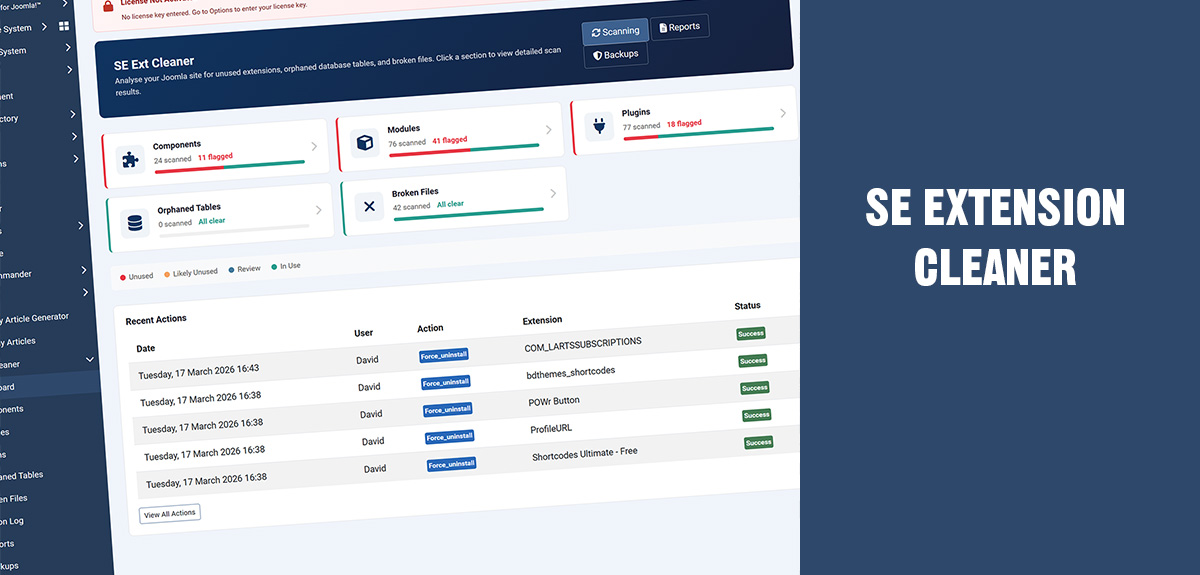
SE Extension Cleaner runs five intelligent scans across your Joomla installation, each using a weighted scoring system to determine which extensions are genuinely in use, which are dormant, and which have been left behind entirely.
- Detects unused components, modules and plugins instantly
- Finds orphaned database tables from removed extensions
- Identifies broken extensions with missing files on disk
- Optional AI analysis via Claude, OpenAI, DeepSeek or Gemini
- Automatic SQL backups before every destructive action
- Safelist items you've already reviewed
- Export comprehensive PDF and CSV audit reports
- Full action log tracking every change made
Buy SE AI Extension Cleaner — £39 · Documentation
What makes it different from just looking at your extension manager?
The Joomla extension manager shows you what's installed. SE Extension Cleaner tells you what's actually being used. There's a big difference.
A component might be enabled but have no menu items pointing to it, no database content, and no module assignments — a near-zero score that flags it as a clear removal candidate. Contrast that with a component serving active menu items and thousands of rows of data, which scores high and is marked as in use. That nuance is what makes the difference between a confident pre-upgrade cleanup and a nervous one.
The AI analysis layer (new in v2.1.0) adds plain-English explanations alongside any scan result. Connect your preferred provider — Claude, OpenAI, DeepSeek or Gemini — and click Analyse next to any flagged item to get a clear answer: what it is, whether it's safe to remove, and what to watch out for. No data is sent anywhere until you explicitly ask.
Recommended pre-upgrade workflow
- Run a full five-category scan and export the PDF audit report
- Review results — use AI analysis on anything you're unsure about
- Safelist anything that's intentionally unused but should stay
- Disable candidates first — test the site for a few days
- Uninstall confirmed orphans via Joomla's Extension Manager
- Drop orphaned database tables (SQL backup created automatically)
- Run a final scan — then proceed with your Joomla upgrade
Then tackle your images: the silent disk hog
Extension clutter is the visible problem. Image clutter is the quiet one. Every deleted article, every replaced banner, every uninstalled page builder left images behind in your /images/ directory. On a site that's been running for a few years, this can amount to hundreds — sometimes thousands — of files that serve no purpose but take up space and slow your backups.
Before a major upgrade, there's never been a better time to address it. A smaller, cleaner media directory means faster file transfers, faster backup restores if something goes wrong, and less noise when you're reviewing what the new site actually contains.
Disk space isn't the only reason to clean your images. Slow, bloated backups during a Joomla upgrade are a real risk. A backup that takes twice as long is a backup you're twice as likely to interrupt.
SE Image Cleaner
£39 · Joomla 4, 5 & 6 · v1.7.5
SE Image Cleaner cross-references every file in your /images/ directory against every reference in your database — across Joomla core and popular third-party extensions — and surfaces exactly which images aren't used anywhere on your site.
- Smart orphan detection across Joomla and popular extensions
- AJAX scanning with live progress bar — no PHP timeouts on large sites
- Safe two-step deletion with restorable trash folder
- Safelist to protect template or CSS-referenced images
- Core-only or full deep database scan mode
- Image previews, search, sorting and pagination
- One-click restore from trash to original location
- No database tables created — installs and uninstalls cleanly
Buy SE Image Cleaner — £39 · Documentation
It knows about your third-party extensions too
Most image audit tools only check Joomla core content tables. SE Image Cleaner goes further. Out of the box it understands SP Page Builder, K2, EasyBlog, VirtueMart, Kunena, JCE, Akeeba Engage, and many more. When you run a deep scan, it checks every text column in every table in your database — catching image references you might not even know existed.
The result is a reliable, comprehensive list of genuinely unused files, not a blunt sweep that risks deleting things still in use. Images you know are referenced in template files or custom code can be safelisted so they never show up as false positives again.
Get both tools for less with the Joomla Cleaner Bundle
The real power of these tools is when you run them in sequence as part of a deliberate pre-upgrade process. Clean up your extensions first — remove the dead weight, close out the orphaned tables, resolve the broken installs. Then run the image audit with a cleaner database state, so the scan reflects your actual live content.
That's exactly what the Joomla Cleaner Bundle is built for.
| Individual | Bundle | |
|---|---|---|
| SE AI Extension Cleaner | £39 | ✓ Included |
| SE Image Cleaner | £39 | ✓ Included |
| Total | £78 | £65 |
| You save | — | £13 |
Both extensions are included with 12 months of support and updates. Developer licences are available as optional extras at checkout for unlimited site activations. You can also add a hands-on clean-up service if you'd rather we do the work for you.
Get the Joomla Cleaner Bundle — £65
Don't leave it until upgrade day
The worst time to discover a problem is mid-upgrade. A broken extension you didn't know was installed becomes an error on the upgrade log. An orphaned database table that conflicts with a new schema becomes a show-stopper. The whole point of a pre-upgrade audit is to surface these issues while you still have time to deal with them calmly.
Summer is traditionally when Joomla site owners find a window for major maintenance. If that's on your plan this year, the Joomla Cleaner Bundle is the sensible place to start — before you touch a template, a version number, or a backup restore button.
Browse the full range of SE24Media extensions for Joomla.
If you've ever upgraded a Joomla site from one major version to another, you know the feeling. You click the update button, hold your breath, and hope that the 47 extensions you installed over the past three years all play nicely with the new version. Sometimes they do. Often, they don't.
The reality is that most Joomla sites carry dead weight — extensions that were installed once and forgotten, database tables left behind by components that were deleted via FTP instead of properly uninstalled, and plugins that belong to extensions you removed two years ago. This clutter doesn't just waste space. It actively makes upgrades riskier, because every orphaned file, every abandoned database table, and every broken extension record is another thing that can go wrong during a migration.
SE Extension Cleaner was built to solve exactly this problem. And with version 2.1.0, it now brings AI analysis into the mix — giving you an expert second opinion on every item it finds.
What actually goes wrong during Joomla upgrades
When you upgrade from Joomla 4 to 5, or from 5 to 6, the upgrade process touches the database, rewrites core files, and expects every installed extension to follow the current architecture. Here's where things typically break down.
Ghost extensions are entries in the #__extensions database table for components, modules, or plugins whose files no longer exist on disk. Maybe someone deleted them manually, or a previous uninstall failed halfway. Joomla's updater sees these entries, tries to process them, and throws errors. On a clean site this never happens. On a site that's been running for five years with dozens of extensions installed and removed, it's almost guaranteed.
Orphaned database tables are tables created by extensions that were later removed without a proper uninstall. They sit in your database doing nothing, but during an upgrade they can cause schema conflicts, slow down database migrations, and make it harder to diagnose real problems because you're wading through noise. We've seen sites with 40 or 50 orphaned tables from extensions like K2, VirtueMart, AcyMailing, and SP Page Builder that were uninstalled years ago but left their tables behind.
Deprecated core extensions are another common issue. Joomla 4 removed com_search, the old two-factor authentication plugins, and several others. Joomla 5 removed the compatibility plugin and the end-of-support quickicon plugins. If your site was originally built on Joomla 3 and upgraded through 4, these deprecated entries are probably still sitting in your database. They show up as broken extensions with missing files, and they can interfere with the upgrade process.
Unused third-party extensions are the most common problem of all. That contact form plugin you tried for a week. The social media module you never configured. The SEO component you replaced with something better. They're all still there — enabled, loaded on every page request, and potentially incompatible with the Joomla version you're upgrading to.
How SE Extension Cleaner finds all of it
The extension runs five targeted scans, each looking at a different category of potential problems.
The component scan checks every third-party component against four criteria: does it have frontend menu items, does it have data in its database tables, is it referenced by any modules, and is it currently enabled. Each criterion contributes to a score out of 100, and the score determines whether the component is classified as Unused, Likely Unused, Review, or In Use. A disabled component with no menu items and empty tables scores near zero — that's a clear candidate for removal before an upgrade.
The module scan looks at every site module and checks whether it's published, whether it's assigned to any pages, whether its position exists in your active template, and whether its parent extension is still installed. That last check catches a surprisingly common problem: you uninstall a component but forget that it had a companion module. The module instance stays in the database, assigned to a template position, doing nothing except potentially causing errors.
The plugin scan evaluates every third-party plugin for enabled state, file integrity, and parent component relationships. It identifies integration plugins that belong to extensions you've already removed — things like a plg_content_hikashop that's still registered even though HikaShop was uninstalled months ago.
The orphaned tables scan compares every table in your database against a map of known extensions. This map covers over 100 popular Joomla extensions — from Akeeba Backup and Admin Tools to Kunena Forum and RSForm Pro. When the scanner finds a table that doesn't match any installed extension, it flags it and tells you who probably created it. It also checks the extension cleaner's own action log, so if you previously removed an extension through this tool, it remembers and can identify the leftover tables.
The broken files scan finds extensions that are registered in the database but have missing or incomplete files on disk. It distinguishes between three severity levels: critical (entire directory missing), warning (manifest or service provider missing), and notice (minor file mismatches that don't affect functionality). For known extensions like SP Page Builder, JCE Editor, and Convert Forms, it provides specific notes explaining that certain file mismatches are expected after a Joomla major version change and can be safely ignored.
What's new in v2.1.0: AI-powered analysis
All of the scanning described above works through deterministic checks — database queries, file system lookups, and pattern matching. It's reliable and fast, but it has limits. It can tell you that a table called xyz_cache_items has 3,000 rows and doesn't match any installed extension. What it can't tell you is that based on the column structure, this looks like a transient cache table from a form builder that was uninstalled, the data is almost certainly stale, and dropping it carries minimal risk.
That's where the AI analysis comes in.
Version 2.1.0 adds an optional AI integration that connects to your choice of four providers: Anthropic Claude, OpenAI, DeepSeek, or Google Gemini. You choose your provider, paste your API key in the component options, and test the connection from the dashboard. Once connected, every item on every scan view gets an Analyse button.
Click it, and the extension sends that item's scan data to the AI with a Joomla-specific prompt. For a component, it sends the element name, the score breakdown, the menu item count, the database row count, and the enabled state. For an orphaned table, it sends the table name, the full column structure including column names, data types, and key information, the row count, and the probable owner. The AI comes back with a plain-English explanation: what the item is, whether the data suggests it's safe to remove, and what to watch out for.
This is particularly valuable in three situations.
Unknown orphaned tables. The curated prefix map covers the most popular extensions, but Joomla's ecosystem is vast. When the scanner flags a table as "Unknown owner", the AI can often identify it from the column names and types alone. A table with columns like id, hash, content, created, and expires is almost certainly a cache table. One with user_id, subscription_id, start_date, and amount is membership data you probably want to think twice about dropping.
Extensions you don't recognise. If your site was built by someone else, or if you inherited a client site, you might not know what half the installed extensions do. The AI can identify most popular Joomla extensions by their element name and explain their purpose, so you can make an informed decision about whether to keep or remove them before upgrading.
Broken file diagnosis. When the scanner flags an extension with missing files, the AI can explain whether this is a genuine problem that needs fixing before an upgrade, or a harmless artefact of Joomla's evolving file structure. It can distinguish between a deprecated core extension that should be force-uninstalled, a third-party extension that needs updating to a Joomla 5-compatible version, and a minor manifest mismatch that can be safely ignored.
AI in the PDF report
The AI doesn't just work in the browser. When you export a PDF Site Audit Report, the AI generates an executive summary for each scan section — a concise paragraph highlighting the most important findings, any patterns it notices (like multiple leftover tables from the same vendor), and a clear recommendation. Any items you've previously analysed individually also have their AI responses included inline in the report.
This makes the PDF report genuinely useful for handoff scenarios. If you're a developer preparing an upgrade for a client, or an agency documenting the state of a site before migration, the AI-enhanced report gives you a professional document that explains the findings in plain language rather than just listing database column names and status codes.
Privacy and cost
A fair question: what data gets sent to the AI? The answer is extension metadata only — element names, table names, column structures, scores, and status flags. No user data, no passwords, no site content. The AI never sees the actual data in your tables, just the schema.
On cost: each analysis uses a few hundred tokens of input and up to 500 tokens of output. At current API pricing, that's a fraction of a cent per item. Responses are cached for seven days, so clicking Analyse on the same item twice doesn't cost anything extra. The section summaries for the PDF report are also cached. A full report export on a site with 50 flagged items might cost a few cents in total.
And if you don't want AI at all, you don't have to use it. The extension works identically without it. When no AI provider is configured, the Analyse buttons appear greyed out and disabled. No data is sent anywhere. Every feature that existed in v2.0.5 works exactly as before.
The safe upgrade workflow
Whether or not you use the AI features, SE Extension Cleaner encourages a deliberate, safe workflow for pre-upgrade cleanup.
Step one: back up everything. Before you touch anything, take a full site backup with Akeeba Backup or your hosting provider's backup tool. SE Extension Cleaner has its own Safe Mode that creates SQL backups before every destructive action, but a full site backup is your ultimate safety net.
Step two: scan. Run a full scan from the dashboard. It takes a few seconds and covers all five categories.
Step three: clean up broken files first. These are the items most likely to cause upgrade failures. Force-uninstall any extensions whose files are completely missing — they're already non-functional and their database entries are just clutter. For extensions flagged as "Needs Attention" or "Manifest Mismatch", check whether an update is available that fixes the issue.
Step four: deal with orphaned tables. Drop empty tables from extensions you know you've removed. For tables with data, use the AI Analyse button if you're unsure what the data is. Be cautious with anything you can't identify — mark it as Safe rather than dropping it if in doubt.
Step five: disable, don't delete. For components and plugins flagged as Unused or Likely Unused, disable them first. Test your site thoroughly. Leave them disabled for a few days. If nothing breaks, uninstall them through Joomla's Extension Manager. The extension deliberately offers "Disable" as the primary action rather than "Uninstall" because disabling is reversible.
Step six: export a report. Generate a PDF report documenting everything you found and everything you did. This is your audit trail. If anything goes wrong during the upgrade, you'll know exactly what the site looked like before you started.
Step seven: upgrade. With the clutter cleared, deprecated extensions removed, and broken file entries cleaned up, your upgrade has far fewer things that can go wrong. The Joomla updater is processing a clean database and a clean file system, not fighting through years of accumulated debris.
Getting started
SE Extension Cleaner requires Joomla 5 or later and PHP 8.1+. Install it through Joomla's Extension Manager, enter your license key in the component options, and run your first scan. The whole process from installation to your first full scan report takes about two minutes.
The AI features require an API key from your chosen provider — Anthropic, OpenAI, DeepSeek, or Google. If you don't have one, the extension works perfectly well without AI. The built-in scanning, scoring, and owner identification cover the vast majority of cleanup scenarios. The AI is there for the edge cases and for the convenience of having everything explained in plain English.
Version 2.1.0 is a free update for all existing license holders or available to new customers.
You can buy it here
If you have any questions, need a quote or what to chat to me about websites, please fill out the form and I will get back to you as soon as possible or call me on: